
Look, the AI art world is absolutely exploding right now. We’re talking $23.79 billion by 2030 for digital art overall, and AI art specifically hitting $5.3 billion in 2025. Translation? There’s real money to be made if you know what you’re doing.
Here’s the thing though – just generating pretty pictures isn’t enough anymore. The market’s gotten more sophisticated, and buyers know what they want. About 29% of digital artists are already using AI tools, and platforms like Etsy have finally figured out how to handle AI-generated content (spoiler: they’re cool with it, but you need to follow their rules).
This guide’s going to walk you through the whole process – from picking the right tools to actually getting paid. Let’s dive in.
The Best AI Image Tools Right Now
Alright, let’s talk tools. The landscape has changed massively in the last few months, and some of these new players are straight-up game-changers.
The Heavy Hitters
Midjourney ($10-$120/month)
Show Image Screenshot: Midjourney’s web interface with a high-quality generated image – consider capturing the prompt box, generation options, and a stunning result Still the king for artistic, mood-driven work. Version 7 is insane – we’re talking photorealistic quality that’ll make you do a double-take. You’ll need Discord or their web app, which is a bit clunky, but the results? Worth it.
- Best for: Artistic vibes, character art, anything that needs emotional impact
- Real talk: The $10 Basic plan gets you about 200 images/month
- Pro tip: Once you hit 100 images, you get web access (finally ditching Discord)
DALL-E 3 (Free with ChatGPT / $20/month for Plus)
Show Image Screenshot: DALL-E 3 integrated in ChatGPT – show the chat interface with prompt and generated image side by side
Living inside ChatGPT now, which makes it super accessible. The conversation-style prompting is clutch – you can literally chat your way to the perfect image. Great with text in images too.
- Best for: Quick iterations, precise prompts, anything with text
- Why it’s cool: You can refine images conversationally
- Free tier exists but has limits
Google Nano Banana (aka Gemini 2.5 Flash Image) – FREE!
Show Image Screenshot: Nano Banana in action showing before/after of character-consistent editing – capture the Gemini interface with the image editing capabilities
This is the new hotness everyone’s talking about on Reddit. Google just dropped this in late 2024 and it’s already the #1 rated image editing model on LMArena. Seriously underrated.
- Best for: Character consistency, one-shot edits, blending multiple images
- What makes it special: Keeps faces/characters consistent across edits better than anything else
- Access it: Free through Gemini app or Google AI Studio
- Nano Banana Pro (Gemini 3 Pro Image) – The premium version with 4K output, insane text rendering, and can actually create legible text in multiple languages. Just rolled out in December 2024.
Flux.1 (Free to $0.039/image via API)
Show Image Comparison: Same prompt across Flux Schnell (fast), Dev (balanced), and Pro (quality) – show the quality differences
From the same folks who made Stable Diffusion. This thing went viral on Reddit for creating terrifyingly realistic images. Three versions available:
- Flux Schnell – Free, fast, open-source (Apache 2.0 license = commercial use OK)
- Flux Dev – Mid-tier, research/non-commercial
- Flux Pro – Top quality, best photorealism
- Flux Kontext (New!) – Image editing capabilities, can maintain character consistency
- Reddit’s verdict: “3-5x better than previous open-source options”
The Ones You Should Know About
Adobe Firefly (Free tier + subscriptions)
Show Image Screenshot: Adobe Firefly’s integration in Photoshop – show the generative fill tool in action
If you need commercial safety, this is it. Trained only on Adobe Stock and public domain stuff, so no copyright drama. Integrates with Photoshop beautifully.
- Best for: Professional work, commercial projects, brand assets
- Latest: Firefly 3 just dropped with better quality
Ideogram (Free + paid plans)
Show Image Screenshot: Ideogram generating a poster with perfect text rendering – show the clear, legible text quality
The typography king. If you need actual readable text in your images (posters, logos, memes), this is your tool. Version 3 is crushing it right now according to Twitter.
- Best for: Text-heavy designs, t-shirt graphics, posters, memes
- Reddit loves it for: Clear text rendering (finally!)
Recraft (Free + paid) Vector-first generator that’s perfect for logos and branding. Clean lines, scalable graphics, and it just works.
- Best for: Logos, icons, brand assets, UI elements
- Sweet spot: Professional graphics without needing Illustrator skills
Leonardo AI (Free tier is generous)
Show Image Screenshot: Leonardo AI’s model selector and generation options – highlight the variety of style models available
Game developers swear by this. Multiple fine-tuned models, and the free tier actually gives you enough credits to experiment properly.
- Best for: Game assets, anime, 3D-style renders
- Bonus: Has AI video generation now
Playground AI (Free + paid) Reddit favorite for versatility. Access to different models and filters, super easy to use.
- Best for: Experimentation, trying different styles
- Why people like it: User-friendly, multiple models
Microsoft Designer (Free – 15 images/day) Currently Reddit’s #1 pick for free tools. Uses DALL-E tech but makes it dead simple.
- Best for: Beginners, quick mockups, social media graphics
- No-brainer if you’re just starting
NightCafe (Free credits + paid) Tons of models, you earn points for making images, super active community.
- Best for: Learning, experimenting, community feedback
- Why it’s cool: You can actually generate free images by being active
For The Technical Folks
Stable Diffusion (Free/Open-Source) Still the most flexible if you know your way around code. Run it locally, train custom models, go wild. Versions 3.5 and SDXL are the current standards.
- Best for: Full control freaks, custom training, high-volume needs
- Reality check: Steep learning curve, needs good hardware
Getimg.ai (100 free credits/month, $12+ paid) Found this gem in a Reddit thread. Can generate up to 10 images at once with paid plans. Super transparent about speed.
- Best for: Batch generation, testing multiple variants
- Watch out: Diversity in outputs can be inconsistent
Quick Comparison: What Should You Actually Use?
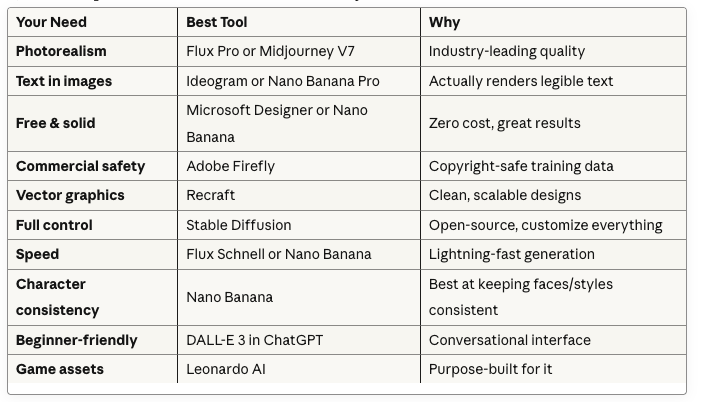
Show Image Quick reference: Match your needs to the right tool – save time and money
If you want photorealism: Flux Pro or Midjourney V7 If you need text in images: Ideogram or Nano Banana Pro
If you’re broke: Microsoft Designer or Nano Banana (both free and solid) If you need commercial safety: Adobe Firefly If you want vector graphics: Recraft If you’re technical: Stable Diffusion If you want the fastest results: Flux Schnell or Nano Banana If you need character consistency: Nano Banana (seriously, it’s the best at this)
Pro tip from Reddit: Most people end up using 2-3 tools. One for fast drafts (Nano Banana/Microsoft Designer), one for final quality (Midjourney/Flux Pro), and sometimes a specialist tool like Ideogram for text work.
What Can You Actually Sell?
Here’s where it gets interesting. AI art isn’t just “pretty pictures” anymore – there’s actual demand for specific stuff.
Digital Downloads That Sell
Wall Art Think abstract pieces, landscapes, motivational quotes with backgrounds. Etsy is full of people crushing it with printable wall art at $5-$15 per download.
Coloring Books Adults love these. Create themed packs (mandalas, animals, fantasy) and sell as PDFs. Bonus: Kids’ coloring books are evergreen.
Social Media Templates Instagram story templates, post backgrounds, Pinterest pins. Influencers and small businesses eat this up.
Planner Inserts Custom covers, dividers, stickers for digital planners. Huge market on Etsy.
Presentation Backgrounds Professional backgrounds for Zoom, Google Slides, PowerPoint. Corporate buyers pay well for these.
Print-On-Demand Gold
You don’t hold inventory, the POD service prints and ships when someone orders. Your job? Create the designs.
- T-shirts (funny quotes, abstract art, niche interests)
- Mugs (always a winner)
- Phone cases
- Posters and canvas prints
- Stickers (especially for laptops and water bottles)
- Home decor (throw pillows, blankets, shower curtains)
Stock Photography Alternative
Businesses need images for blogs, websites, ads. They can’t all afford photographers, so they buy stock images. AI-generated stock is:
- Cheaper to produce
- Faster to create
- You can make exactly what’s trending
Focus on: business concepts, lifestyle shots, technology themes, nature scenes that look realistic.
Custom Services (Higher $$$)
Pet Portraits Upload a photo, turn it into fantasy art, cartoon style, oil painting style. Charge $30-150 depending on complexity.
Logo Concepts Create 5-10 variations for a client’s brand. Quick turnaround. $50-200 per project.
Book Covers Indie authors need covers. Fantasy, sci-fi, romance genres especially. $100-500 per cover.
Product Mockups Background scenes for product photography. E-commerce sellers need tons of these.
Where to Actually Sell This Stuff
Etsy: The Creative Goldmine
Show Image Screenshot: A successful AI art Etsy shop with professional mockups and clear listings – blur out shop name
Etsy updated their policy in July 2024, and here’s the deal:
What’s Allowed: ✓ AI-generated art using YOUR original prompts ✓ Finished artwork (not just prompt bundles) ✓ Art you’ve edited or combined with other elements
What You MUST Do:
- Disclose AI use in your description (just be honest)
- Label as “Designed by” not “Handmade”
- Use original prompts (not bought from someone else)
What’s Banned: ✗ Selling AI prompt packs alone (like “1000 Midjourney prompts”) ✗ Calling it “Handmade” ✗ Being sneaky about the AI part
Pricing on Etsy:
- Single digital download: $5-$15
- Art bundles (5-10 pieces): $15-$30
- Commercial licenses: $25-$100+
- Custom portraits: $30-$150
How to Win on Etsy:
Show Image Example: Professional mockup of AI art in a styled room – this is what makes listings sell
- Niche down (don’t just sell “wall art” – sell “boho nursery wall art” or “minimalist office prints”)
- SEO is everything (use Etsy search to find what people actually search for)
- Show it in context (mockups of your art on walls, in frames)
- Build a collection, not random pieces
- Customer photos = gold (encourage reviews with photos)
Stock Photo Sites
Wirestock – The AI Artist’s Best Friend This is where you should start. Upload once, they distribute to Adobe Stock, Freepik, Dreamstime, and others.
- Commission: 15% (marketplace sales) or 35% (direct sales, 3% for premium)
- Why it’s good: One upload, multiple platforms
- Pro tip: Use code for 20% off premium (search for current codes)
Adobe Stock Major buyers, good money, but quality bar is high.
- Focus on: Commercial-viable, clean, professional images
- Avoid: Obvious AI artifacts, unrealistic elements
Vecteezy 50/50 split, lower volume but also less competition.
Tips for Stock Success:
- Make what businesses actually need (not just what looks cool)
- Think: office environments, diversity shots, technology, business concepts
- Keywords are CRITICAL (spend time on these)
- Volume game – successful sellers have hundreds/thousands of images
- Consistency > randomness
Print-On-Demand Platforms
Redbubble – The Easiest Entry
Show Image Example: One AI design automatically applied to t-shirts, mugs, stickers, and phone cases on Redbubble
Upload once, appears on 70+ products automatically.
- Markup: You set it (15-25% is typical)
- No fees to start
- They handle everything (printing, shipping, customer service)
- Best for: Testing designs with zero risk
Society6 More curated, artsy vibe. Good for decorative/aesthetic work.
- Commission structure varies by product
- Less volume than Redbubble but higher quality buyers
TeePublic T-shirt focused, built-in audience of buyers.
- Easy to start
- Good for niche/fandom designs (but watch copyright!)
Zazzle Huge product catalog, older platform, still solid.
Amazon Merch on Demand Massive reach but:
- Need approval (apply and wait)
- More competitive
- Amazon’s audience = big potential
POD Strategy:
- Start with Redbubble (easiest)
- Add 2-3 more platforms once you have 20-30 designs
- Focus on niches (not generic designs)
- Seasonal stuff sells (Christmas, Halloween, back-to-school)
Your Own Store
Payhip (Free to start) No storage limits, just transaction fees. Build your own storefront.
- Good for: Building a brand, keeping more profit
- Challenge: You need to drive your own traffic
Gumroad (Free + fees) Popular with digital artists. Clean interface, built-in audience.
- Road to Discovery feature helps with traffic
- Great for: Digital downloads, bundles
Sellfy (All-in-one) Built-in marketing tools, email integration.
- More expensive but more features
- Good if you’re serious about it
Freelance/Service Platforms
Fiverr Offer packages like:
- “I’ll create 5 AI fantasy portraits for $30”
- “Custom pet portrait in 3 styles for $50”
- “10 social media graphics for $75”
Start with lower prices to get reviews, then increase.
Upwork More professional clients, higher rates possible.
- Position yourself as a creative professional using AI tools
- Don’t just compete on price
Teachers Pay Teachers If you can create educational stuff, this is gold.
- Worksheets with AI-generated illustrations
- Coloring pages
- Classroom posters
- Teaching resources
AI Art-Specific Platforms
AI Art Shop 25% commission, they handle printing and shipping for physical prints.
- Curated marketplace
- Getting featured = big visibility boost
Artsi 95% commission for beta vendors (yes, really).
- Still growing platform
- Worth trying
Quick Platform Strategy
Don’t try to be everywhere at once. Start with:
- Etsy (digital downloads + instant audience)
- Wirestock (passive stock income)
- Redbubble (POD with zero risk)
Once you’re making consistent sales: 4. Add Fiverr (active income) 5. Build your own store (brand building) 6. Expand to more POD sites
The key? Master one platform before adding the next.
Pricing: Don’t Shoot Yourself in the Foot
Here’s the truth: pricing is part science, part gut feeling, part trial-and-error. Let’s break it down.
Digital Downloads
The Sweet Spots:
- Basic digital art (for personal use): $5-$10
- Think: single wall art print, phone wallpaper
- High-res printables: $10-$30
- Better quality, larger sizes, commercial potential
- Commercial licenses: $25-$100
- Business can use it in their marketing
- Exclusive rights (they’re the only one who can use it): $100-$500+
Bundles = More Money: Instead of selling one image for $10, sell 5 for $25. People love feeling like they’re getting a deal.
Custom Work
Pet Portraits:
- Basic style: $30-$50
- Multiple styles/revisions: $75-$150
- Rush delivery: Add 50%
Logo Concepts:
- 3-5 variations: $50-$100
- Full branding pack: $150-$300
Book Covers:
- Ebook cover: $100-$200
- Print + ebook package: $200-$500
Product Mockups:
- Single mockup: $15-$30
- Set of 10: $100-$150
Print Products (If You Do POD)
You set a markup. Typical strategy:
- Redbubble products: 15-25% markup on their base
- Higher for unique/niche designs
- Lower to stay competitive on generic stuff
The Pricing Psychology Stuff That Actually Works
Show Image Visual: Side-by-side comparison of $19.99 vs $20 pricing and bundle discount strategies
$19 vs $20 Sounds dumb, but $19 sells better than $20. Same with $9.99 vs $10. Just how brains work.
Anchor High Show a $50 option, then a $30 option looks like a steal. Create a “premium” tier even if most people buy mid-tier.
Bundle Discount
- Single: $10
- Three-pack: $25 (was $30!)
- People love a deal
What NOT to Do
Don’t race to the bottom. Selling everything for $1 makes no one money except the platform. Your time has value.
Don’t overprice starting out. You need reviews first. Price to sell initially, then raise prices after you have social proof.
Don’t forget platform fees. Etsy takes 6.5% transaction fee + $0.20 listing fee. Factor this in!
Real Talk on Pricing Strategy
Start competitive, learn the market:
- Check what similar items sell for
- Start at or slightly below average
- Track what sells
- Slowly increase prices as you get reviews
- Test $12 vs $15 vs $18 and see what converts
The Volume vs. Premium Choice:
- Volume: Lower prices ($5-10), make it up in sales. Good for passive income streams.
- Premium: Higher prices ($30-100+), fewer sales but more per sale. Good for custom work.
Choose based on your goal. Want passive income? Go volume. Want to trade time for money? Go premium custom work.
My Honest Recommendation
Start with these prices:
- Digital downloads: $8-$12
- Custom work: $50-$75
- Bundles: 3x for price of 2.5
Then adjust based on:
- How fast stuff sells (selling out? Raise prices)
- Competition in your niche
- Your skill level improving
- Platform you’re on
Remember: It’s easier to lower a price than raise it. Start slightly higher than you’re comfortable with.
Legal Stuff (Don’t Skip This!)
Yeah, I know, legal stuff is boring. But getting this wrong can cost you, so let’s make it quick and painless.
Copyright: The Reality Check
Here’s the uncomfortable truth: The US Copyright Office says purely AI-generated art can’t be copyrighted.
What does that mean?
- Technically, anyone could use your AI image without consequences
- BUT you can still sell it under commercial use terms
- Add human creativity (editing, combining, curating) and you’re in stronger legal territory
Different Tools, Different Rules:
Midjourney (Paid plans): ✓ Full commercial rights on paid subscriptions ✗ Free trials are personal use only
DALL-E 3: ✓ Can use commercially (including the images you make) ✓ Covered under ChatGPT terms
Nano Banana/Gemini: ✓ Can use commercially based on Google’s terms ✓ They watermark with SynthID for transparency
Adobe Firefly: ✓ Trained on licensed/public domain = commercially safe ✓ Best for avoiding copyright drama
Flux: ✓ Schnell version = Apache 2.0 license (free commercial use) ✓ Dev = non-commercial only ✓ Pro = commercial license via API
Stable Diffusion: ✓ CreativeML Open RAIL-M license ✓ Commercial use allowed (with some ethical restrictions)
What You Can’t Do (Seriously, Don’t)
Absolutely Forbidden:
- Disney characters, Marvel/DC heroes, Harry Potter stuff = nope
- Real celebrities without permission = nope
- Trademarked logos = nope
- Other artists’ copyrighted styles (trying to copy them) = nope
- Anything NSFW involving minors = ILLEGAL
The “But it’s AI” defense doesn’t work. If the AI was trained on copyrighted material and you’re profiting from reproductions, you could get sued.
How to Protect Yourself
Document Everything:
- Save your prompts
- Screenshot your process
- Keep multiple iterations
- Show your editing work
Why? Proves you added human creativity = stronger copyright position.
Watermark Strategy:
- Low-res previews with watermarks
- High-res only after purchase
- Optional: Add subtle signature to final work
Platform-Specific Must-Dos:
Etsy:
- Must disclose AI use in description
- Must use original prompts
- Must label as “Designed by”
- Breaking these = listings get pulled
Stock Sites:
- Tag as AI-generated
- No trademarked content
- No recognizable people (unless you have releases)
- High quality only (they’re picky)
The Smart Move
Use these rules of thumb:
- Original prompts only – Don’t use bought prompt packs on Etsy
- Edit and curate – Add human touches
- Be honest – Disclose AI use where required
- Stay away from obvious copyright issues – No Mickey Mouse, period
- Read platform terms – They change frequently
Licenses You Can Offer
Personal Use License (Base price)
- Buyer can print for themselves, non-commercial
Commercial License (+2-3x price)
- Buyer can use in business, ads, products
- Specify limits (geographic, time-based, usage)
Exclusive License (+5-10x price)
- Only they can use it, you can’t resell
- Usually for unique business branding
When In Doubt
If you’re making serious money, talk to a lawyer. Reddit can’t give you legal advice, and neither can I. This is general info, not legal counsel.
But for most people starting out: Be honest about AI use, don’t steal copyrighted characters, and add your own creative input. You’ll be fine.
Marketing (Because Nobody Will Find You Otherwise)
Creating good art is like 30% of the battle. Marketing is the other 70%. Here’s how to actually get eyeballs on your stuff.
Social Media That Actually Works
Instagram (Visual storytelling)
- Post your final pieces + process shots
- Reels showing before/after edits crush it
- Use: #AIart #AIartist #digitalart #aiartcommunity #generativeart
- Engage with other AI artists’ content
- Story polls to involve followers in decisions
Pinterest (Traffic machine)
- Create pins for each piece
- Link directly to your shop
- Pinterest users are buyers, not just browsers
- Categories: “AI wall art,” “printable art,” “digital downloads”
TikTok (If you’re brave)
- Show generation process sped up
- Before/after transformations
- “I made X using AI” trending sounds
- Don’t overthink it, just post
Twitter/X
- AI art community is HUGE here
- Share process, tips, tools you use
- Engage in #AIart discussions
- Be helpful = people remember you
Reddit (Proceed carefully)
- r/aiArt, r/midjourney, r/StableDiffusion
- Read the rules (self-promo usually banned)
- Participate genuinely, share knowledge
- People will check your profile if you’re helpful
Content Marketing (The Long Game)
Start a Blog
- “How I made this design”
- “Best prompts for [style]”
- Your creative process
- Tool comparisons
SEO benefits + establishes expertise = more sales long-term
Email List (Your money list)
- Offer free samples for emails
- Weekly/monthly new releases
- Exclusive subscriber discounts
- This is YOUR audience, not Instagram’s
SEO for Marketplaces
Etsy/Amazon Strategy:
- Use Etsy search bar, type your niche
- Look at autocomplete suggestions
- Those = what people actually search
- Use those phrases in titles/tags
Example: “minimalist nursery wall art” not just “wall art”
Title Formula That Works: [Style] [Subject] [Use Case] [File Type] [Unique Benefit]
“Boho Nursery Wall Art | Printable Digital Download | Neutral Tones”
The Reality of Growth
Month 1: Crickets (maybe 1-2 sales if you’re lucky) Month 2: Starting to show up in search, few sales Month 3: Algorithm likes you, consistent trickle Month 6: If you’ve been consistent, decent side income
The key word? CONSISTENT
Upload regularly. Post regularly. Engage regularly.
What Actually Drives Sales
- Quality previews (show your art in context – on walls, in frames)
- Clear descriptions (what they get, file formats, sizes)
- Reviews (first 5 reviews are CRITICAL – ask friends/family if needed)
- Multiple products (20 listings > 5 listings, always)
- Seasonal timing (Christmas stuff in Oct/Nov, not December)
Quick Wins
- Run a “20% off first order” promo
- Respond to every message in <24 hours
- Add new items weekly
- Share customer photos (with permission)
- Collaborate with other creators
The Stuff That Doesn’t Work
❌ Buying followers/engagement ❌ Spam-following people ❌ Posting once a month ❌ Only posting product shots ❌ Ignoring comments ❌ Copying others’ exact style
Actually Getting Started (Your Action Plan)
Okay, enough theory. Here’s what you do THIS WEEK.
Week 1: Setup
Day 1-2:
- Pick your primary AI tool (free option: Nano Banana or Microsoft Designer)
- Create accounts on Etsy + one other platform (Redbubble is easy)
- Research your niche (what’s selling in your category?)
Day 3-4:
- Generate 20-30 images
- Pick your best 10
- Edit/enhance them if needed
Day 5-7:
- Create mockups (Placeit.net or Canva)
- Write descriptions with SEO keywords
- List your first 5-10 products
- Set up social media (at least Instagram)
Week 2: Launch
- Post on social media about your new shop
- Share with friends/family
- Join 3-5 relevant Facebook groups or subreddits
- Start creating content (process videos, tips)
Week 3: Optimize
- Check which listings got views
- Adjust titles/tags based on data
- Add 5-10 more listings
- Engage with potential customers’ questions
Week 4: Scale
- Analyze what sold (if anything)
- Make more in that style
- Try a different platform
- Start email list building
Month 2-3: Double Down
What worked in month 1? Do more of that. What didn’t? Stop doing it.
Goal Milestones:
- Month 1: First sale (any sale)
- Month 3: 10+ sales
- Month 6: $500/month
- Month 12: $1,000/month
These are realistic for someone putting in consistent effort.
The Real Path to $1,000/Month
Here’s the math:
- 100 listings on Etsy at $10 each
- Average 2% conversion rate
- Need 5,000 views/month
- = 100 sales = $1,000
OR
- 20 custom gigs on Fiverr at $50 each
- = $1,000
OR
- 500 stock images earning $2 each on average
- = $1,000
Pick your path. Volume game, custom work, or passive stock? Each works.
Common Mistakes (Learn From Others’ Pain)
Mistake #1: Trying to be everywhere at once → Master one platform first
Mistake #2: Giving up after 2 weeks → This takes 3-6 months to gain traction
Mistake #3: Not standing out → Generic = invisible. Find your style/niche.
Mistake #4: Terrible mockups → Your thumbnail is everything. Invest time here.
Mistake #5: Ignoring customer service → Fast responses = better reviews = more sales
Mistake #6: No consistency → Posting random stuff randomly doesn’t work
Mistake #7: Pricing too low → Race to bottom helps no one
Mistake #8: Not tracking what works → Data tells you where to focus
Mistake #9: Perfectionism paralysis → Done > perfect. Ship it.
Mistake #10: Expecting overnight success → This is a marathon, not a sprint
Final Real Talk
Can you make money selling AI art? Yes.
Will you get rich quick? Probably not.
Is it worth trying? Absolutely, if you’re realistic about it.
Here’s what I wish someone told me: This is a real business. It requires:
- Consistent effort (not just when you feel like it)
- Learning (tools, marketing, SEO)
- Patience (months, not days)
- Adaptation (what works changes)
But here’s the cool part: You can start for free, test everything, and scale what works. No inventory, no huge startup costs, no warehouse.
The AI art market is still relatively new. Early movers have an advantage. But “early” is closing. The platforms are maturing, buyers are getting more sophisticated, and competition is increasing.
That means now is still a good time, but “someday” isn’t a strategy.
Your Move
Pick one AI tool. Pick one platform. Create 10 pieces. List them. See what happens.
Then adjust and repeat.
That’s it. That’s the whole game.
Everything else is just optimization of those basics.
Now stop reading and go make something.
Your Week 1 Checklist:
□ Choose AI tool (Nano Banana, Microsoft Designer, or Midjourney)
□ Create 20 images in your chosen niche
□ Sign up for Etsy + one other platform
□ Make 5 mockup images
□ Write SEO-optimized titles
□ List your first 5-10 products
□ Set up Instagram/Pinterest
□ Post your first content
□ Join 3 relevant communities
□ Set calendar reminder to check stats in 1 week
Ready? Let’s go.